Overview
What it is
A11y Auditor takes a URL or an HTML snippet, loads it in headless Chromium, and runs axe-core against the rendered page. Because it is a real browser, CSS, web fonts, and client-rendered markup are all in scope.
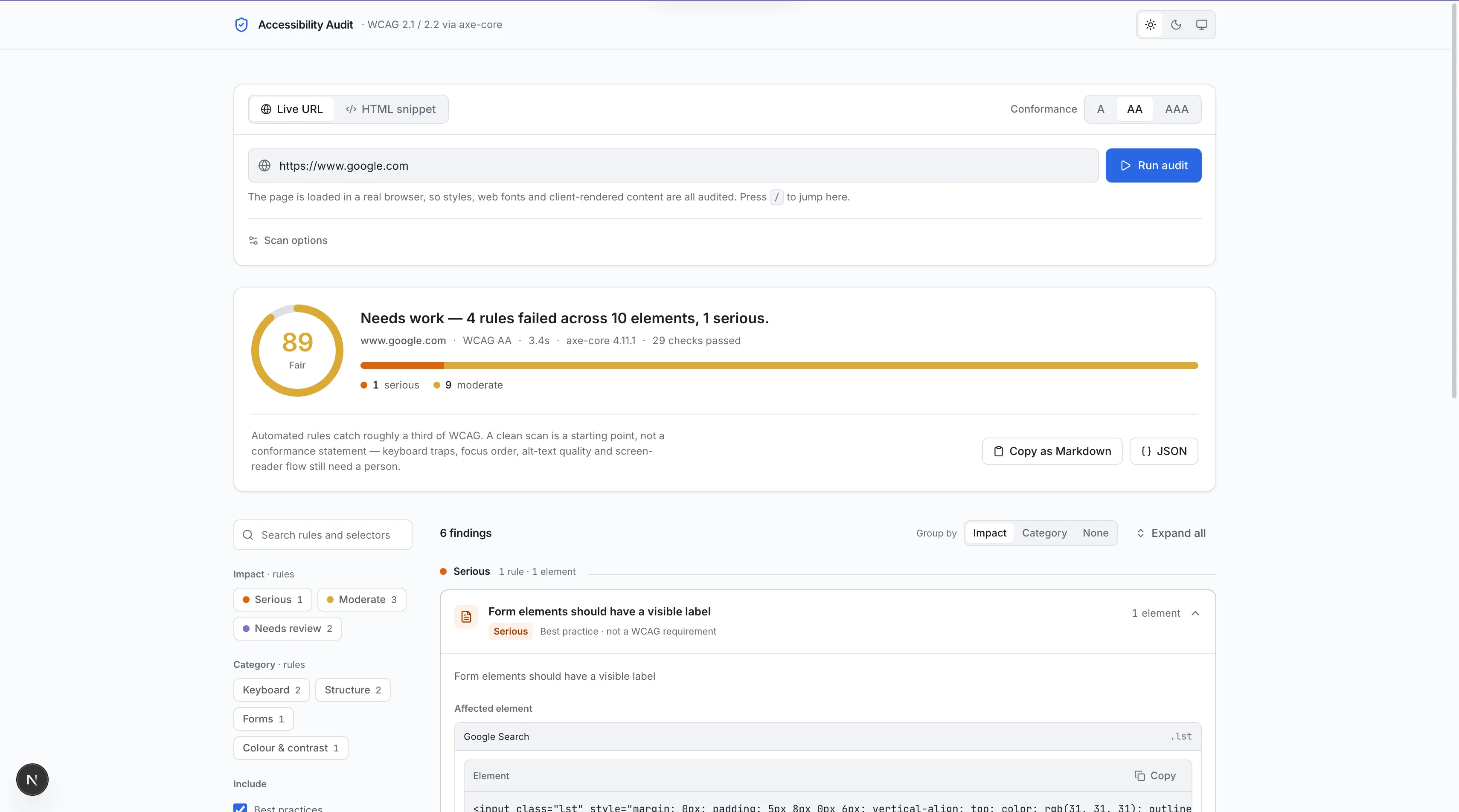
The output is organised around the WCAG rule rather than the axe rule id, with a score, counts by severity, and filters for category. Contrast failures show the measured ratio, the required ratio, and the font size that decides which threshold applies.
Motivation
Why I built it
I was running axe in devtools on every project and re-reading the same wall of JSON each time. I wanted the same information in a form I could look at without parsing it in my head.
The second reason is that most quick checkers read raw HTML, which misses anything that only exists after JavaScript runs. That covers most of what I actually build, so a checker that does not render the page was not useful to me.
I also wanted output that named the WCAG criterion directly. Most checkers report their own rule ids and assume you already know what maps to what, which is the part that makes accessibility work feel gatekept.
Decisions
How it works
axe-core does the rules, I do the presentation
Reimplementing WCAG checks would be a mistake. axe-core is maintained and trusted, so the work here is mapping its tags onto the success criteria and levels people are actually audited against, and making the result readable.
Real Chromium, one engine for both inputs
Playwright loads the page and runs its JavaScript before axe sees the DOM. Pasted snippets render into the same headless page, so the URL path and the snippet path share one code path rather than drifting apart.
A remote browser in production
Serverless runtimes do not ship a browser. In production a configured remote CDP endpoint is tried first, because waiting for a local launch that is guaranteed to fail wastes seconds on every scan. In development the local install wins.
Friction
What was hard
Automated checks find a minority of real problems
Roughly a third of WCAG is machine-checkable, and the rest needs a person. axe also ships best-practice rules that are not WCAG requirements. Presenting a score without being clear about both is how these tools mislead people, and it is the part I am least satisfied with.
Scans are slow and that is structural
Booting a browser and rendering a page takes tens of seconds. The scan in the screenshot took about 48 seconds end to end. Caching helps on repeats, but the first scan is always going to feel slow.
Repeated failures still read as separate problems
One bad colour pair used in twenty places currently shows up as twenty findings. Collapsing those into a single decision is the next thing worth building and the change that would make the tool genuinely good.
The state of it
Where it stands
The limitations, in plain terms. Every project here is something I built and use, not something I am selling.
Stack
The rule engine is axe-core, not mine. This adds real browser rendering, the mapping onto WCAG criteria and levels, and the presentation.
A clean report does not mean an accessible page. It means the automated subset passed.
Findings are not yet deduplicated, so the issue count reads higher than the number of actual fixes.
The hosted version runs on a free tier and depends on a remote browser, so a scan can time out on a heavy page.
Next project